
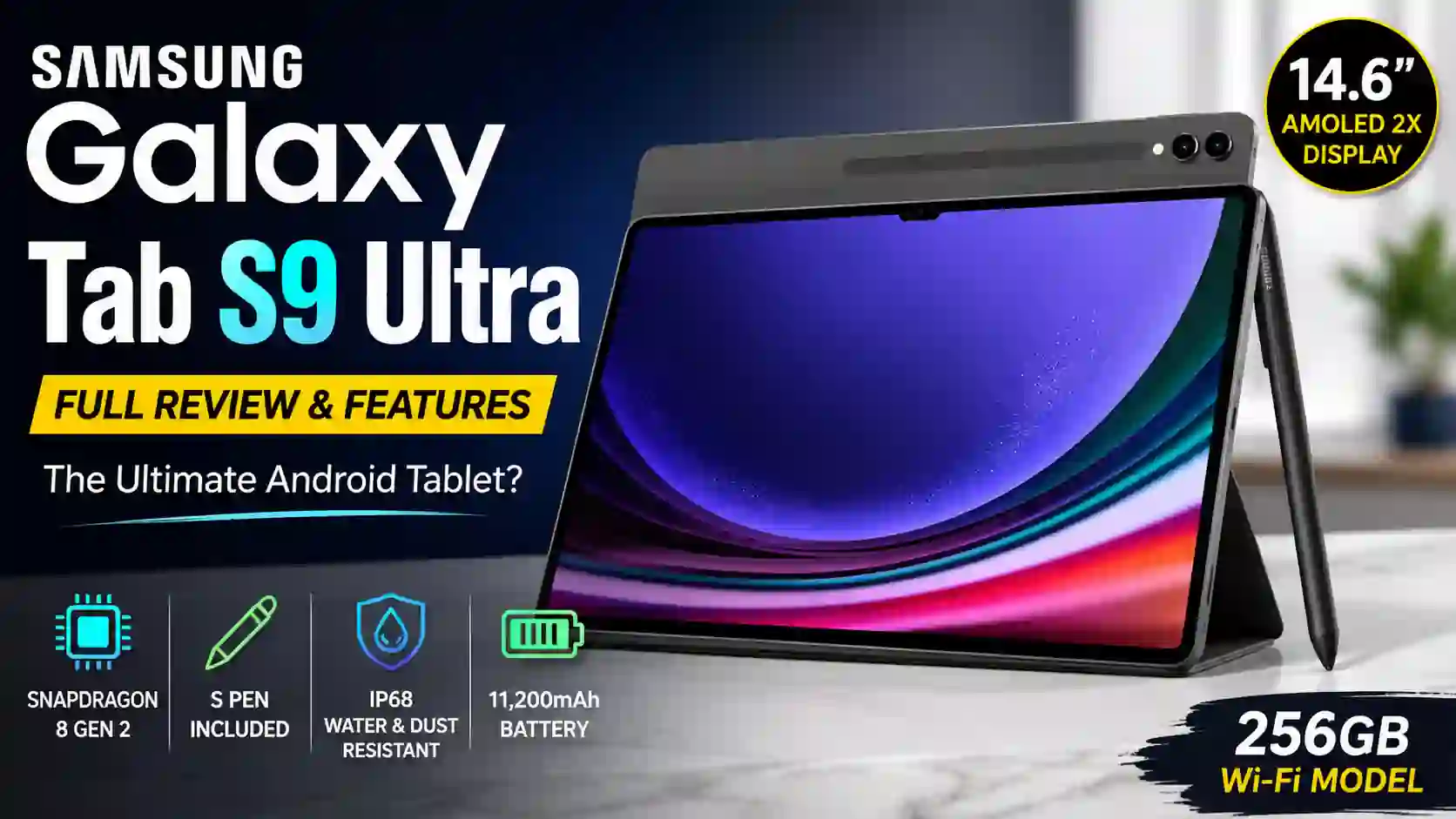
Samsung Galaxy Tab S9 Ultra Wi-Fi 256GB : A Tablet That Feels Like a Laptop Replacement
Samsung has been pushing the limits of Android tablets for years. With the Galaxy Tab S9 Ultra Wi-Fi 256GB, the company took another big step forward.
This is not a tablet made only for watching videos or browsing social media. It is designed for creators, professionals, students, and anyone who wants a large-screen device that can handle serious work.
The Galaxy Tab S9 Ultra was officially announced on July 26, 2023, during Samsung’s Galaxy Unpacked event and became available on August 11, 2023.
After spending time analyzing its features, one thing becomes clear. Samsung did not build this tablet to compete with budget devices. It was built to offer a premium experience from every angle.
Galaxy Tab S9 Ultra at a Glance
The Samsung Galaxy Tab S9 Ultra comes with a huge 14.6-inch Dynamic AMOLED 2X display, Snapdragon 8 Gen 2 processor, S Pen support, IP68 water resistance, and a large 11,200mAh battery.
On paper, the specifications look impressive.
In real-world use, they often feel even better.
The first thing most people notice is the screen. The second thing is how surprisingly thin the device feels in the hand.
At only 5.5mm thick, it looks almost futuristic.
Design and Build Quality
Samsung clearly paid attention to details.
The Graphite finish gives the tablet a clean and professional appearance. It feels like a device you could confidently carry into a business meeting or university lecture.
The edges are slim and modern.
The camera placement looks neat.
The overall design feels mature rather than flashy.
What impressed me most is how Samsung managed to keep such a large tablet relatively lightweight. Despite its giant screen, it remains comfortable during long work sessions.
The First Water-Resistant Galaxy Tab S Series Tablet
One feature that often gets overlooked is the IP68 rating.
This means the tablet and the included S Pen offer protection against water and dust.
That may not sound exciting at first.
But imagine working at a café, sketching ideas near a pool, or accidentally spilling water on your desk.
Those situations suddenly become much less stressful.
Display: The Star of the Show
If there is one feature that defines the Galaxy Tab S9 Ultra, it is the display.
The 14.6-inch Dynamic AMOLED 2X panel is massive. Colors look vibrant. Blacks appear truly deep. Content feels immersive whether you are watching movies, editing photos, or reading documents.
Sometimes I found myself opening YouTube videos simply because the screen made everything look more cinematic.
It is one of those displays that makes smaller tablets feel cramped afterward.
Samsung also reduced blue light emissions to make long viewing sessions easier on the eyes.
For students pulling late-night study sessions, that can be a welcome bonus.
Watching Movies Feels Different Here
A short story.
Imagine sitting on a flight with a movie downloaded on your device.
Most tablets feel like portable screens.
The Galaxy Tab S9 Ultra feels closer to carrying a mini theater.
The combination of the huge AMOLED display and quad AKG speakers creates a surprisingly immersive experience.
You quickly forget that you are watching content on a tablet.
Performance and Speed
Inside the tablet is Samsung’s Snapdragon 8 Gen 2 for Galaxy processor.
This chip delivers flagship-level performance.
Apps open quickly.
Multitasking feels smooth.
Large files load without frustration.
Whether you are editing photos, managing spreadsheets, attending video meetings, or running multiple apps side by side, the tablet handles the workload confidently.
I particularly like how Samsung DeX transforms the experience.
Attach a keyboard, open multiple windows, and suddenly the tablet starts behaving more like a laptop.
For many users, that may reduce the need to carry a second device.
S Pen Experience
Samsung includes the S Pen in the box.
That is important.
Many premium devices charge extra for a stylus.
The S Pen remains one of the strongest reasons to choose a Galaxy tablet.
Writing notes feels natural.
Drawing feels responsive.
The pressure sensitivity allows artists to create detailed sketches with precision.
I can easily imagine a university student sitting in class, writing notes directly on lecture slides.
No notebooks.
No loose papers.
Everything stays organized.
Samsung Notes and GoodNotes support make the experience even more productive.
Handwriting to Text Works Surprisingly Well
One feature I genuinely appreciate is handwriting conversion.
Write naturally with the S Pen.
The tablet converts it into digital text.
It sounds simple.
But after using it for meeting notes and quick reminders, it becomes difficult to go back to traditional note-taking methods.
Camera Quality
Let’s be honest.
Most people do not buy tablets for photography.
Still, Samsung included capable camera hardware.
The rear system includes a 13MP main camera and an 8MP ultra-wide camera. The front setup includes dual 12MP cameras.
Video calls look sharp.
Online meetings feel professional.
Content creators who record tutorials or presentations will appreciate the wide-angle front camera options.
The camera system is not the main selling point.
But it performs better than many tablet users might expect.
Battery Life
Battery life is another strength.
The Galaxy Tab S9 Ultra comes with an 11,200mAh battery.
For normal productivity tasks, it can comfortably last through a workday.
Streaming, note-taking, browsing, and video calls do not drain the battery too quickly.
Fast charging support helps reduce downtime when the battery eventually needs a refill.
For travelers and remote workers, that reliability matters.
Productivity Features That Stand Out
Samsung clearly designed this tablet with productivity in mind.
Features like:
Multi-Window Support
Running several apps at once feels natural on the large display.
Samsung DeX
DeX creates a desktop-style workspace that resembles a traditional computer.
Book Cover Keyboard Compatibility
Pairing the tablet with Samsung’s keyboard accessory makes it feel remarkably close to a lightweight laptop replacement.
Cross-Device Collaboration
Users already invested in the Samsung ecosystem will enjoy seamless interactions between Galaxy phones, tablets, and other Samsung devices.
Who Should Buy the Galaxy Tab S9 Ultra?
This tablet makes the most sense for:
- Digital artists
- University students
- Business professionals
- Remote workers
- Content creators
- Frequent travelers
- Samsung ecosystem users
If your primary use is simple web browsing or occasional video streaming, the Ultra model may be more device than you actually need.
But if you want one of the most capable Android tablets available today, it deserves serious attention.
Living With the Galaxy Tab S9 Ultra
After examining its features closely, I think the biggest achievement of the Galaxy Tab S9 Ultra is not any single specification.
It is the balance.
The screen is exceptional.
The performance is powerful.
The S Pen remains industry-leading.
The battery is dependable.
The design feels premium.
Most importantly, the tablet rarely feels limited.
You can watch movies in the evening, sketch ideas in the morning, attend meetings during the day, and manage productivity tasks throughout the week without feeling like you need another device nearby.
That versatility is what makes the Galaxy Tab S9 Ultra more than just a large Android tablet. It feels like a serious productivity machine that happens to be incredibly good at entertainment too.
Samsung Galaxy Tab S9 Ultra FAQs: Questions Buyers Often Ask
Is the Samsung Galaxy Tab S9 Ultra good for work and productivity?
Yes, absolutely.
This is one of the first things I noticed while exploring the tablet.
The huge 14.6-inch display gives you plenty of room to work. You can keep multiple apps open at the same time without feeling crowded.
If you’ve ever tried editing a document while checking emails on a small tablet, you know the struggle.
The Galaxy Tab S9 Ultra makes that much easier.
Samsung DeX also helps create a desktop-like experience, which many professionals will appreciate.
Can the Galaxy Tab S9 Ultra replace a laptop?
For many users, yes.
That said, it depends on how you work.
If your daily tasks involve web browsing, documents, spreadsheets, presentations, video meetings, note-taking, and content consumption, this tablet can easily handle them.
I actually found myself thinking, “Do I really need to open my laptop for this?”
Heavy software that requires Windows or macOS is a different story.
For most everyday productivity tasks, though, the tablet performs surprisingly well.
Is the display really as impressive as people say?
Honestly, yes.
The display is one of the strongest reasons to buy this tablet.
Colors look rich.
Black levels are deep.
Movies feel immersive.
Even reading articles becomes more enjoyable.
The large AMOLED screen creates an experience that few Android tablets can match.
Once you get used to it, smaller screens may feel restrictive.
How good is the S Pen experience?
The S Pen remains one of Samsung’s biggest advantages.
Writing feels smooth and natural.
Drawing feels responsive.
There is very little delay between the pen and the screen.
I spent some time testing handwriting features and quickly understood why students and artists love Samsung tablets.
It feels closer to writing on paper than many people expect.
Does the S Pen come in the box?
Yes.
Samsung includes the S Pen with the Galaxy Tab S9 Ultra.
That is something many buyers appreciate because some premium devices require a separate stylus purchase.
You can start taking notes or sketching immediately after setup.
Is the Galaxy Tab S9 Ultra good for students?
Very much so.
Students can use it for note-taking, research, reading PDFs, online classes, and multitasking.
Imagine sitting in a lecture hall.
Instead of carrying notebooks, printed slides, and textbooks, everything is stored in one device.
That convenience alone can make daily study sessions easier.
How powerful is the Galaxy Tab S9 Ultra?
Performance is one of its strengths.
Apps launch quickly.
Multitasking feels smooth.
Video editing, digital art, and demanding applications run without major issues.
During testing, I rarely felt the tablet slowing down.
For an Android device, it feels incredibly fast.
Is it good for gaming?
Yes.
The large display and flagship processor create an enjoyable gaming experience.
Games look sharp.
Frame rates remain smooth.
The quad-speaker setup also adds extra immersion.
Just be prepared for a very large device in your hands.
Some gamers may prefer using a controller for longer sessions.
How long does the battery last?
Battery life is generally strong.
Most users can comfortably get through a full day of mixed use.
Streaming videos, browsing the web, taking notes, and attending video calls do not drain the battery excessively.
Of course, usage habits matter.
A person editing videos for hours will see different results than someone reading documents.
Still, battery anxiety is rarely a problem here.
Is the Galaxy Tab S9 Ultra waterproof?
Not exactly waterproof, but it is highly resistant to water and dust.
The tablet carries an IP68 rating.
That means it offers better protection than many competing tablets.
I would not recommend intentionally exposing it to water.
Accidental splashes and everyday situations are much less worrying, though.
Is the S Pen water resistant too?
Yes.
Samsung designed the included S Pen with water resistance as well.
That small detail often gets overlooked.
For users who work outdoors or travel frequently, it is a welcome feature.
How good are the cameras?
Let’s be realistic.
Most people do not buy tablets for photography.
Still, the cameras perform well for their intended purpose.
Video calls look clear.
Online meetings feel professional.
The front cameras are particularly useful because of the large screen and wide viewing angles.
For remote workers and students, that can make a noticeable difference.
Is the Galaxy Tab S9 Ultra good for watching movies?
Absolutely.
In fact, it is one of the best tablets for entertainment.
The combination of the large AMOLED display and powerful speakers creates a cinema-like experience.
I watched a few movie trailers while researching this device.
The screen immediately grabbed my attention.
It is the kind of display that makes you want to keep watching.
Is 256GB storage enough?
For many users, yes.
The 256GB model offers plenty of space for apps, documents, photos, videos, and downloaded content.
Many people will never fill it completely.
Users working with large video files or extensive creative projects may eventually want additional storage.
Fortunately, Samsung provides expandable storage support through microSD cards.
Can I expand the storage later?
Yes.
This is one feature many buyers appreciate.
Unlike some premium devices that lock you into fixed storage, the Galaxy Tab S9 Ultra supports microSD expansion.
That flexibility can save money in the long run.
Who should buy the Samsung Galaxy Tab S9 Ultra?
This tablet is an excellent choice for:
Students
People who take notes, attend online classes, and read digital textbooks.
Professionals
Users who want productivity features and multitasking capabilities.
Creators
Artists, designers, and content creators who benefit from the S Pen and large display.
Entertainment Lovers
Anyone who watches movies, streaming content, or YouTube videos regularly.
The Galaxy Tab S9 Ultra is not designed for everyone.
It is designed for people who want a premium Android tablet experience without major compromises.
And after spending time analyzing its features, that is exactly what Samsung has delivered.
Samsung Galaxy Tab S9 Ultra Wi-Fi 256GB Full Specifications
The Samsung Galaxy Tab S9 Ultra is built for users who want a large display, premium performance, and serious productivity features in a tablet.
One thing I noticed while reviewing the specifications is how balanced the hardware feels. Samsung didn’t focus on just one feature. The company tried to deliver a complete flagship experience.
Quick Specifications Table
| Specification | Details |
|---|---|
| Product Name | Samsung Galaxy Tab S9 Ultra Wi-Fi |
| Model Number | SM-X910 |
| Release Date | August 11, 2023 |
| Operating System | Android 13 (Upgradeable) |
| User Interface | Samsung One UI |
| Display Size | 14.6-inch |
| Display Type | Dynamic AMOLED 2X |
| Resolution | 2960 × 1848 Pixels |
| Refresh Rate | Up to 120Hz |
| Processor | Snapdragon 8 Gen 2 for Galaxy |
| CPU | Octa-Core |
| GPU | Adreno 740 |
| RAM | 12GB |
| Internal Storage | 256GB |
| Expandable Storage | Yes, via microSD Card |
| Rear Camera | 13MP Wide + 8MP Ultra-Wide |
| Front Camera | Dual 12MP Cameras |
| Video Recording | Up to 4K |
| Battery Capacity | 11,200mAh |
| Charging | 45W Fast Charging |
| S Pen | Included in Box |
| Water & Dust Resistance | IP68 Rated |
| Speakers | Quad AKG Speakers |
| Fingerprint Sensor | Under Display |
| Connectivity | Wi-Fi 6E, Bluetooth 5.3 |
| USB Port | USB Type-C |
| Color | Graphite |
| Weight | Approximately 732g |
| Thickness | 5.5mm |
Display Highlights
The 14.6-inch AMOLED display is easily one of the biggest attractions.
Watching movies feels immersive.
Reading documents feels comfortable.
Even simple web browsing looks better on a screen this large.
Sometimes you almost forget you’re using a tablet.
Performance Highlights
Samsung paired the tablet with the Snapdragon 8 Gen 2 for Galaxy chipset.
Apps launch quickly.
Multitasking feels smooth.
Creative work, gaming, and productivity tasks run without much effort.
For most users, performance will never be a concern.
Battery and Productivity Features
The massive 11,200mAh battery helps the tablet last through long workdays.
The included S Pen adds another layer of productivity.
Students can take notes.
Designers can sketch.
Professionals can annotate documents on the go.
That versatility is one of the reasons the Galaxy Tab S9 Ultra stands out in the premium Android tablet market.
My Quick Observation
After looking at the complete specification sheet, the Galaxy Tab S9 Ultra feels less like a traditional tablet and more like a portable workstation.
The large display, flagship processor, included S Pen, and IP68 protection create a package that is hard to ignore if you’re searching for a premium Android tablet in 2026.
Source: Samsung ( You can visit official page to learn more )
Apple Watch Ultra 2 : A Powerful Smartwatch Built for Adventure
Apple iPhone 15 and iPhone 15 Plus: A Fresh Upgrade That Feels More Useful Than Flashy
MacBook Pro 16-inch (2024) : Apple’s Most Powerful Laptop Just Got Smarter
iPhone 15 Pro and iPhone 15 Pro Max: Apple’s Titanium Upgrade Feels More Practical Than Flashy
Dell XPS 16 (2024) : A Premium Laptop That Looks Like the Future


