
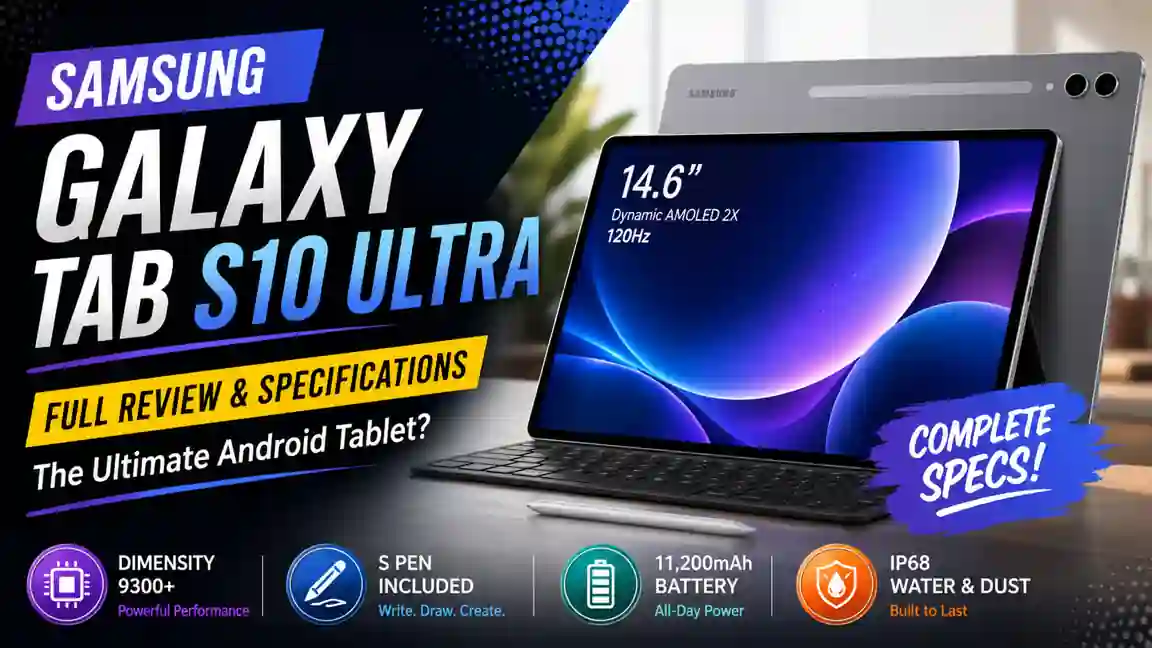
Samsung Galaxy Tab S10 Ultra : A Giant Android Tablet That Feels Like a Laptop Replacement
Samsung has been pushing Android tablets forward for years. Some models were good. Some were excellent. But every once in a while, Samsung releases a device that makes people stop and say, “Okay, this is serious.”
The Samsung Galaxy Tab S10 Ultra is one of those devices.
With a massive 14.6-inch display, powerful hardware, Galaxy AI features, and premium design, this tablet is clearly aimed at users who want more than just a screen for watching YouTube.
After spending time looking at its features, specs, and overall direction, it feels like Samsung is trying to blur the line between tablet and laptop more than ever.
Release Date: September 27, 2024 (Official Announcement) and available from October 3, 2024.
First Impressions: It Doesn’t Feel Like a Normal Tablet
When you first see the Galaxy Tab S10 Ultra, the screen grabs your attention immediately.
A 14.6-inch display on a tablet sounds almost ridiculous on paper.
Then you see it in real life.
Suddenly it makes sense.
The thin bezels make the screen feel endless. Whether you’re opening multiple apps, editing documents, sketching with the S Pen, or simply watching a movie, the large display changes the experience completely.
I remember showing a similar Ultra tablet to a friend who mainly used an iPad. His first reaction was simple:
“That’s not a tablet anymore.”
Honestly, he wasn’t entirely wrong.
Display Quality Is Easily One of the Biggest Selling Points
The Galaxy Tab S10 Ultra comes with a 14.6-inch Dynamic AMOLED 2X display featuring a 2960 x 1848 resolution and a 120Hz refresh rate.
Samsung displays are usually excellent.
This one feels like Samsung decided to show off.
Colors look rich without feeling unnatural. Blacks are deep. Brightness is impressive, and Samsung has also added anti-reflective technology to reduce glare.
That anti-reflective coating sounds like a small feature.
It’s not.
If you’ve ever tried working near a window or under bright lights, you’ll understand why it matters.
The display also supports Vision Booster, helping visibility in brighter environments.
Watching Netflix on this thing feels closer to carrying a portable cinema than a tablet.
Design: Thin, Premium, and Surprisingly Elegant
Samsung kept the design clean.
The Galaxy Tab S10 Ultra measures only around 5.4mm thick and weighs approximately 723g for the 5G model.
It’s a large device, no doubt.
Yet it doesn’t feel bulky.
The aluminum construction gives it a premium feel. The silver finish especially looks professional and modern.
If you’re carrying this into meetings, classrooms, or creative studios, it definitely gives off a premium vibe.
Not flashy.
Just expensive-looking.
S Pen Support Makes a Real Difference
Samsung includes the S Pen in the box.
That’s something many users still appreciate.
For note-taking, drawing, document signing, or brainstorming ideas, the S Pen turns the tablet into a productivity machine.
One student shared online that they stopped carrying notebooks after switching to Samsung’s tablet ecosystem.
At first, I thought that sounded exaggerated.
Then I remembered how many people already do exactly that.
For students, designers, and professionals, the S Pen isn’t just an accessory.
It’s part of the experience.
Performance: Fast Enough for Almost Anything
Under the hood, Samsung uses the MediaTek Dimensity 9300+ processor.
This is particularly interesting because Samsung moved away from Qualcomm’s Snapdragon chips for this flagship tablet.
Some people were skeptical at first.
The actual performance tells a different story.
Samsung claims noticeable improvements in CPU, GPU, and AI processing performance compared to the previous generation.
Whether you’re multitasking, gaming, editing videos, or handling large files, the hardware seems more than capable.
The tablet also features a larger vapor chamber cooling system to maintain performance during longer sessions.
That’s important because powerful hardware means very little if the device starts throttling after twenty minutes.
Memory and Storage Options
The 256GB model comes with 12GB RAM, while higher configurations offer up to 16GB RAM and 1TB storage.
There’s also microSD card support for additional storage expansion.
Personally, I think 256GB is already enough for many users.
But creative professionals dealing with large video projects may appreciate the higher storage options.
It’s nice having the choice.
Galaxy AI Takes Center Stage
Samsung is heavily promoting Galaxy AI across its latest devices.
The Galaxy Tab S10 Ultra is no exception.
Features like note summarization, AI-assisted productivity tools, handwriting assistance, and integration with Gemini create a smarter experience.
Now, let’s be honest.
Some AI features across the industry feel like marketing buzzwords.
But a few of Samsung’s tools genuinely look useful.
Students summarizing lecture notes.
Professionals organizing meeting points.
Writers collecting ideas.
These are situations where AI can actually save time.
That’s where it becomes valuable.
Camera Setup: Better Than Most Tablets Need
Most people don’t buy tablets for photography.
Still, Samsung equipped the Tab S10 Ultra with a respectable camera system.
The rear includes a 13MP main camera and an 8MP ultrawide sensor. The front features dual 12MP cameras.
Video calls look sharp.
Online meetings feel professional.
Content creators who occasionally record with a tablet will find the setup more than acceptable.
Would I replace my smartphone camera with it?
Probably not.
But for a tablet, it’s impressive.
Battery Life and Everyday Use
The Galaxy Tab S10 Ultra includes an 11,200mAh battery.
That’s a large battery.
And frankly, it needs to be.
Powering a huge AMOLED display isn’t easy.
Samsung claims up to around 16 hours of video playback depending on usage.
Real-world results always vary.
Heavy gaming, editing, and multitasking will drain it faster.
Still, most users should comfortably get through a full workday.
That matters more than marketing numbers.
Durability and Build Quality
Another underrated feature is the IP68 water and dust resistance rating.
Many tablets still don’t offer this level of protection.
Life happens.
Coffee spills happen.
Unexpected rain happens.
Having that extra layer of protection adds peace of mind.
Especially for people carrying their tablet everywhere.
Who Should Actually Buy the Galaxy Tab S10 Ultra?
Not everyone needs this tablet.
Let’s be realistic.
If you mostly browse social media and watch occasional videos, Samsung offers cheaper alternatives.
The Galaxy Tab S10 Ultra shines when it’s used seriously.
Students.
Artists.
Designers.
Business users.
Video editors.
People who want a laptop-like experience with touchscreen flexibility.
Those users will appreciate what Samsung has built here.
And yes, the huge display won’t be for everyone.
Some people will love it.
Some will think it’s too large.
That’s completely fair.
The good thing is Samsung isn’t trying to make a tablet for everyone.
They’re making a tablet for power users.
And in many ways, they succeeded.
The Galaxy Tab S10 Ultra feels like one of the most ambitious Android tablets available today. The display is stunning, the performance is powerful, the S Pen remains excellent, and the AI tools add modern productivity features without completely taking over the experience. For users who want a premium Android tablet that can genuinely handle work, creativity, entertainment, and multitasking, this device makes a very strong argument for itself.
Samsung Galaxy Tab S10 Ultra FAQs: Real Questions Buyers Are Asking
Frequently Asked Questions About Samsung Galaxy Tab S10 Ultra
These are the questions I keep seeing from students, professionals, creators, and everyday buyers. Some answers come from the official specifications. Others come from practical observation of how people actually use a tablet like this.
Is the Samsung Galaxy Tab S10 Ultra worth buying in 2026?
For many users, yes.
If your work involves multitasking, note-taking, content creation, online classes, or entertainment, the Galaxy Tab S10 Ultra offers a premium experience.
I often hear people say, “It’s expensive for a tablet.”
That’s true.
But after using a large-screen flagship tablet, many users start comparing it to a laptop rather than a regular tablet.
That changes the conversation completely.
How big is the Galaxy Tab S10 Ultra screen?
The tablet features a massive 14.6-inch display.
To put that into perspective, many laptops have screens that are smaller.
Watching movies feels immersive.
Reading documents is comfortable.
Split-screen multitasking becomes genuinely useful instead of feeling cramped.
If you love large displays, you’ll probably smile the first time you turn it on.
Display and Entertainment
Is the Galaxy Tab S10 Ultra good for watching movies and Netflix?
Absolutely.
The Dynamic AMOLED 2X display is one of the biggest reasons people choose this tablet.
Colors look rich.
Black levels are deep.
The 120Hz refresh rate also makes scrolling and animations feel smooth.
I watched a few movie trailers on a similar Samsung AMOLED screen and immediately understood why people praise these displays so much.
Does the screen work well outdoors?
Better than many tablets.
Samsung added anti-reflective technology and Vision Booster features.
Direct sunlight is still challenging for any screen.
But compared to older tablets, visibility is noticeably improved.
That makes a difference if you’re working near windows, on a balcony, or while traveling.
Is the display too large for everyday use?
That depends on your habits.
Some people love the huge screen.
Others prefer something more portable.
If you frequently use split-screen apps, edit documents, or sketch with the S Pen, the extra space feels useful.
If you mainly browse social media in bed, you might find it larger than necessary.
Performance and Productivity
Is the Galaxy Tab S10 Ultra fast enough for multitasking?
Yes.
The MediaTek Dimensity 9300+ processor handles demanding workloads well.
Running multiple apps side by side feels smooth.
Video editing, graphic design work, and productivity tasks are all within its comfort zone.
I honestly think most users will never push this hardware to its limits.
Can the Galaxy Tab S10 Ultra replace a laptop?
For many users, it can.
Students, business professionals, writers, and digital artists may find it capable enough for daily work.
Pair it with a keyboard cover, and the experience becomes surprisingly laptop-like.
Of course, some specialized software still works better on Windows or macOS.
It’s important to be realistic about that.
Does Samsung DeX make a difference?
Yes, and it’s one of Samsung’s best features.
Samsung DeX transforms the tablet into a desktop-style workspace.
Windows can be resized.
Multitasking becomes easier.
External monitors are also supported.
Many people buy Samsung tablets specifically because of DeX.
S Pen Experience
Does the Galaxy Tab S10 Ultra come with an S Pen?
Yes.
The S Pen is included in the box.
That’s something many buyers appreciate because it saves extra spending.
The pen feels responsive and natural.
Whether you’re taking notes, drawing, or marking PDFs, it quickly becomes part of your daily workflow.
Is the S Pen good for students?
Very good.
Students can organize lecture notes, annotate slides, and keep everything in one place.
I once spoke with a university student who said he hadn’t purchased a notebook in months after switching to digital note-taking.
That says a lot.
Can artists use the Galaxy Tab S10 Ultra for drawing?
Definitely.
The large canvas-like display is one of its biggest strengths.
The screen size gives artists more room to work.
Pressure sensitivity and low latency help create a natural drawing experience.
Battery and Charging
How long does the battery last?
Battery life depends on how you use it.
For video streaming, web browsing, and note-taking, it can comfortably last through a full day.
Heavy gaming and video editing will drain it faster.
Still, the large battery provides confidence during long work sessions.
Does the Galaxy Tab S10 Ultra support fast charging?
Yes.
Fast charging is supported.
That becomes very useful when you have a large battery and a busy schedule.
Nobody wants to sit beside a charger all afternoon.
Galaxy AI Features
What Galaxy AI features are available on the Galaxy Tab S10 Ultra?
Samsung includes several AI-powered tools focused on productivity and creativity.
These can help summarize notes, organize information, improve handwriting, and assist with everyday tasks.
Some AI features feel genuinely useful.
Others depend on personal preference.
It’s one of those things you’ll appreciate more after using it for a few weeks.
Is Galaxy AI just a marketing feature?
Not entirely.
I’ll admit I was skeptical when AI started appearing on every new device.
Then I saw how quickly note summaries and writing assistance could save time.
Some features feel practical.
Those are the ones that matter.
Cameras and Video Calls
Are the cameras good on the Galaxy Tab S10 Ultra?
For a tablet, yes.
Video calls look sharp.
Online meetings appear professional.
Front cameras are particularly important because many users spend more time on Zoom, Google Meet, and Teams than taking photos.
Samsung clearly understands that.
Can I use it for online classes and remote work?
Without question.
The large screen, front cameras, speakers, and S Pen make it an excellent device for remote learning and virtual meetings.
Students and professionals are among its strongest target audiences.
Storage and Connectivity
Is 256GB storage enough?
For most people, yes.
Documents, photos, apps, videos, and study materials fit comfortably.
Power users who edit large videos or store extensive media libraries may want higher-capacity models.
The good news is that Samsung still supports microSD card expansion.
That’s becoming increasingly rare in premium devices.
Does the Galaxy Tab S10 Ultra support 5G?
Yes, selected models support 5G connectivity.
That means you can stay connected even when Wi-Fi isn’t available.
For travelers and remote workers, that’s a useful advantage.
Durability and Long-Term Use
Is the Galaxy Tab S10 Ultra waterproof?
It comes with an IP68 rating for water and dust resistance.
That doesn’t mean you should intentionally expose it to water.
Still, accidental splashes or unexpected rain are less stressful when protection is built in.
Who should buy the Galaxy Tab S10 Ultra?
This tablet is best suited for:
Students
People who take notes, read PDFs, and attend online classes.
Creative Professionals
Artists, designers, photographers, and content creators.
Business Users
Those who work on presentations, emails, reports, and video meetings.
Entertainment Lovers
Users who want one of the best displays available on an Android tablet.
If your goal is simply casual web browsing, Samsung offers cheaper options.
If you want one of the most capable Android tablets available today, the Galaxy Tab S10 Ultra remains a very compelling choice.
Samsung Galaxy Tab S10 Ultra Full Specifications
The Samsung Galaxy Tab S10 Ultra is built for users who want a premium Android tablet experience. Looking at the specifications on paper is impressive. Seeing them work together in real life is even better.
Quick Specification Table
| Specification | Details |
|---|---|
| Product Name | Samsung Galaxy Tab S10 Ultra |
| Release Date | September 2024 |
| Operating System | Android 14 with One UI |
| Display Size | 14.6-inch Dynamic AMOLED 2X |
| Resolution | 2960 × 1848 pixels |
| Refresh Rate | Up to 120Hz |
| Processor | MediaTek Dimensity 9300+ |
| RAM | 12GB / 16GB |
| Storage | 256GB / 512GB / 1TB |
| Expandable Storage | Yes, microSD Card Support |
| Rear Camera | 13MP Wide + 8MP Ultra-Wide |
| Front Camera | Dual 12MP Cameras |
| Battery Capacity | 11,200mAh |
| Charging | 45W Fast Charging |
| S Pen | Included in the Box |
| Water & Dust Resistance | IP68 Rated |
| Connectivity | Wi-Fi 7, Bluetooth 5.3, USB-C |
| Network | Wi-Fi and 5G Models Available |
| Security | Fingerprint Scanner |
| Audio | Quad AKG-Tuned Speakers |
| Colors | Silver, Gray |
| Weight | Approx. 723g |
| Thickness | Approx. 5.4mm |
Display Highlights
The display is arguably the star of the show.
A 14.6-inch AMOLED panel is huge for a tablet. Movies look fantastic. Reading documents feels comfortable. Split-screen multitasking finally makes sense.
I remember thinking, “This feels more like a portable workstation than a tablet.”
That’s probably the best way to describe it.
Performance Highlights
Samsung paired the tablet with the MediaTek Dimensity 9300+ processor.
Daily performance feels effortless.
Whether you’re editing videos, managing multiple apps, or attending online meetings, the hardware has plenty of power available.
For most users, performance won’t be a concern for years.
S Pen and Productivity Features
Included S Pen
Unlike some premium devices that charge extra for a stylus, Samsung includes the S Pen inside the box.
That’s something many buyers appreciate.
The writing experience feels natural. Note-taking, sketching, and document editing become much easier.
Samsung DeX Support
Samsung DeX transforms the tablet into a desktop-style workspace.
Connect a keyboard and you quickly start forgetting you’re using a tablet.
It’s one of the features that separates Samsung from many Android competitors.
Battery and Connectivity
Battery Life
The 11,200mAh battery is designed for long workdays and entertainment sessions.
Most users should comfortably get through a full day with normal usage.
Heavy gaming and editing will naturally consume more power.
Modern Connectivity
The Galaxy Tab S10 Ultra supports Wi-Fi 7, Bluetooth 5.3, USB Type-C, and optional 5G connectivity.
That’s exactly what you’d expect from a flagship device in 2026.
Fast connections help make the overall experience feel premium.
Personal Observation
After reviewing the specifications and real-world features, one thing stands out.
Samsung didn’t build the Galaxy Tab S10 Ultra for casual users alone.
This tablet targets students, creators, professionals, and power users who want laptop-level productivity with tablet flexibility.
If screen size, performance, S Pen support, and multitasking matter to you, the Galaxy Tab S10 Ultra remains one of the strongest Android tablet options available today.
Source: Samsung Galaxy Tab S10 Ultra ( You can visit official page to learn more )
MacBook Pro 16-inch (2024) : Apple’s Most Powerful Laptop Just Got Smarter
Apple iPhone 15 and iPhone 15 Plus: A Fresh Upgrade That Feels More Useful Than Flashy
Apple Watch Ultra 2 : A Powerful Smartwatch Built for Adventure
Apple iPad Pro 11-inch (M4) : A Thin Tablet With Serious Power
Apple Watch Series 10 : Apple’s Most Refined Smartwatch Yet?


