
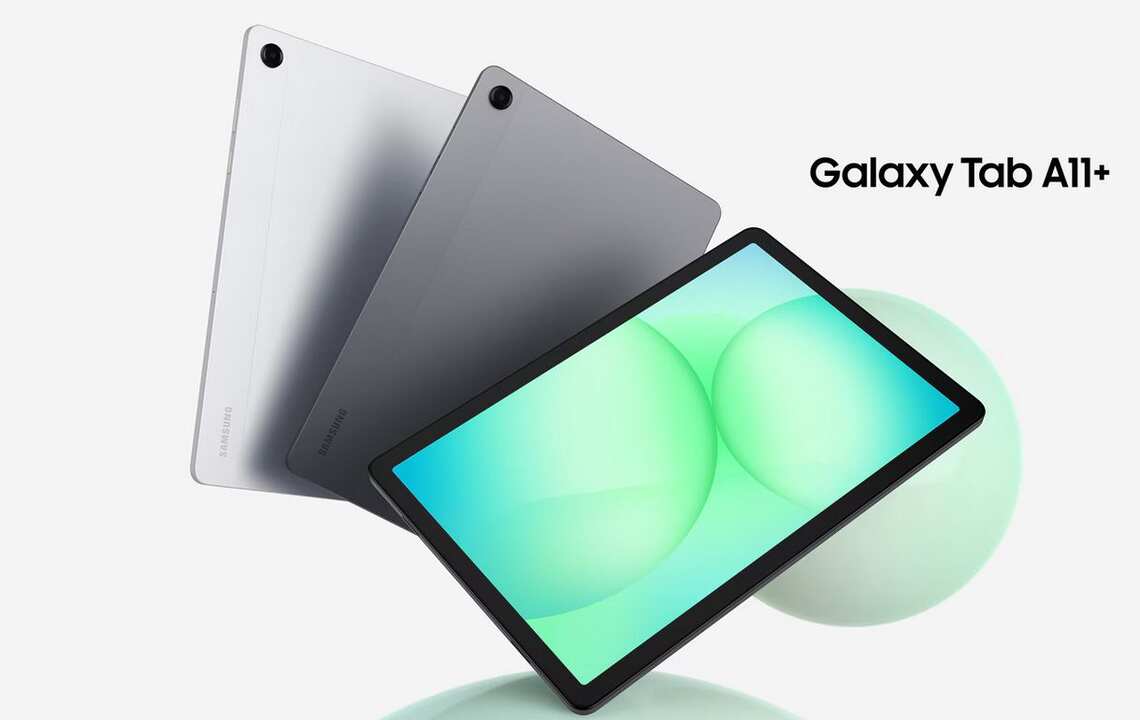
Samsung Galaxy Tab A11 Plus : A Budget Tablet That Feels More Premium Than Expected
Samsung has been one of the most trusted names in the Android tablet market for years. The company offers everything from flagship productivity tablets to affordable devices designed for entertainment and daily use.
The Samsung Galaxy Tab A11 Plus falls into that second category.
At first glance, it may look like another budget tablet. Spend a little time with it, though, and you start to notice several upgrades that make it more interesting than expected.
For students, casual users, families, and anyone who wants a large screen without spending flagship money, the Galaxy Tab A11 Plus deserves attention.
Samsung Galaxy Tab A11 Plus Release Date
Samsung officially introduced the Galaxy Tab A11 Plus in late 2025. The tablet became available in various markets during November and December 2025, while the United States launch started in January 2026. Samsung positioned it as the successor to the Galaxy Tab A9 Plus and focused on improving performance, storage, software support, and everyday usability.
What Is the Samsung Galaxy Tab A11 Plus?
The Galaxy Tab A11 Plus is an 11-inch Android tablet designed for entertainment, learning, browsing, and light productivity.
It is not trying to compete with expensive tablets like the Galaxy Tab S series or Apple’s iPad Pro.
Instead, Samsung is targeting users who want a smooth experience at a reasonable price.
That approach makes sense.
Most people use tablets for YouTube, Netflix, social media, reading, online classes, video calls, and occasional work tasks. The Galaxy Tab A11 Plus focuses directly on those needs.
Display: Large, Smooth, and Comfortable
One of the first things you notice is the display.
Samsung includes an 11-inch screen with a 90Hz refresh rate. That higher refresh rate makes scrolling feel smoother than many budget tablets. Videos also look more fluid during playback.
Everyday Viewing Experience
I spent some time comparing similar budget tablets recently, and many still use standard 60Hz displays.
The difference is noticeable.
Scrolling through social media feeds feels cleaner. Web pages move naturally. Even simple tasks feel a little more premium.
The resolution is not flagship level, but for movies, YouTube videos, online classes, and casual gaming, it performs well.
Performance Improvements Over Previous Models
Samsung upgraded the internal processor compared to the previous generation. According to Samsung, performance has improved significantly over the Galaxy Tab A9 Plus.
Better Multitasking
The tablet handles common tasks comfortably:
- Web browsing
- Streaming
- Video calls
- Document editing
- Social media
- Online learning
No, it is not built for intensive video editing or high-end gaming.
But that’s not the goal.
For everyday users, the performance feels responsive and reliable.
One small story comes to mind.
A friend recently bought a budget tablet for online classes. His biggest complaint was waiting for apps to load while switching between Zoom and browser tabs.
The Galaxy Tab A11 Plus feels much better suited for that type of multitasking.
Storage and Memory Upgrades
Storage is often overlooked until it becomes a problem.
Samsung appears to have learned that lesson.
The base model starts with more storage than previous generations, offering room for apps, downloaded movies, photos, and documents. Some versions also include larger storage options and expandable storage through microSD support.
Why This Matters
A tablet can feel slow when storage becomes full.
Having more room from day one means fewer headaches later.
Students especially benefit from this because educational apps, PDFs, and downloaded lectures can fill storage surprisingly fast.
Audio Experience: Surprisingly Good
Many budget tablets sound thin.
Samsung avoided that trap.
The Galaxy Tab A11 Plus features quad speakers with Dolby Atmos support. That creates a wider and more immersive audio experience than expected at this price range.
Watching Movies Feels Better
Imagine sitting on a couch after work.
You open Netflix.
You don’t want headphones.
The speakers are loud enough and clear enough to make that experience enjoyable.
For a tablet aimed at media consumption, that’s a meaningful advantage.
Design and Build Quality
Samsung has kept the design clean and modern.
The tablet features a slim profile and a refined metal-like appearance that helps it look more expensive than its actual price.
First Impressions Matter
When someone picks it up for the first time, they probably won’t immediately think “budget tablet.”
That is one of Samsung’s strengths.
The company often brings premium design ideas into its more affordable products.
Useful AI Features
Artificial intelligence is appearing in nearly every new device.
Samsung has included AI-powered features in the Galaxy Tab A11 Plus as well.
Features like Circle to Search help users quickly find information directly from images or on-screen content. Samsung has also integrated Gemini-related functionality in supported regions.
Practical Rather Than Flashy
Some AI features feel like marketing.
These feel more useful.
Students can quickly search unfamiliar terms.
Travelers can identify objects or translate text.
Parents can help children find information faster.
That kind of practical value matters more than flashy demonstrations.
Software Support Could Be a Big Advantage
One area where Samsung deserves credit is software support.
Reports indicate that the Galaxy Tab A11 Plus may receive long-term Android update support, something that many budget tablets simply do not offer.
Long-Term Value
A cheap tablet that stops receiving updates after two years isn’t always a bargain.
A device that remains secure and updated for much longer can save money in the long run.
This is especially important for families and students.
5G Connectivity Option
Samsung also offers a 5G version of the Galaxy Tab A11 Plus in some markets.
Freedom Beyond Wi-Fi
Picture a university student traveling between classes.
Or a salesperson working on the road.
Having internet access without depending on public Wi-Fi can be extremely useful.
Not everyone needs it.
Those who do will appreciate having the option.
Personal Observation After Reviewing the Specifications
Looking at the overall package, the Galaxy Tab A11 Plus feels like Samsung focused on improving the areas that users actually notice.
The company didn’t chase flashy benchmark numbers.
Instead, it improved:
- Storage
- Performance
- Display smoothness
- Audio quality
- Software longevity
That’s a smart strategy.
Many users care more about a tablet feeling smooth every day than achieving record-breaking performance scores.
Is the Samsung Galaxy Tab A11 Plus Worth Buying?
For many people, yes.
If your main activities include streaming videos, reading, online classes, browsing the web, video calls, and light productivity work, the Galaxy Tab A11 Plus checks many important boxes.
It offers a large display, solid performance, better storage options, useful AI features, quality speakers, and Samsung’s software ecosystem.
There will always be faster tablets.
There will always be more expensive tablets.
The interesting thing about the Galaxy Tab A11 Plus is how balanced it feels.
It doesn’t try to do everything.
It focuses on doing everyday tasks well, and for most users, that is exactly what matters.
Samsung Galaxy Tab A11 Plus FAQs: Everything Buyers Want to Know
Is the Samsung Galaxy Tab A11 Plus Good for Students?
Yes, it is.
The large 11-inch display gives students plenty of space for reading PDFs, attending online classes, and taking notes. The tablet is also lightweight enough to carry around campus or school.
I recently watched a student use a budget tablet during an online lecture. The biggest issue was switching between learning apps and browser tabs. The Galaxy Tab A11 Plus appears much better equipped for that kind of everyday workload.
Does the Galaxy Tab A11 Plus Support Multitasking?
Yes.
Samsung has improved performance compared to older Galaxy Tab A-series models. Opening multiple apps, browsing the web, and watching videos at the same time feels smoother than many people would expect from a budget tablet.
For everyday users, that’s what really matters.
Is the 90Hz Display Worth It?
Absolutely.
A lot of people don’t think about refresh rates until they use one.
Then they notice it.
Scrolling through social media feels smoother. Websites move more naturally. Even simple actions like navigating menus feel quicker.
It’s one of those features you appreciate every day.
Can the Samsung Galaxy Tab A11 Plus Be Used for Entertainment?
Yes, and that’s actually one of its strongest areas.
How Good Is It for Watching Movies and Videos?
The combination of the large screen and quad speakers creates a pleasant viewing experience.
Whether you’re watching Netflix, YouTube, or Disney+, the tablet feels comfortable for long viewing sessions.
I can easily imagine someone using it on a weekend afternoon for a movie marathon without feeling the need for an expensive device.
Are the Speakers Good Enough Without Headphones?
For most users, yes.
The quad-speaker setup delivers clear sound and decent volume. Voices are easy to understand, and videos sound fuller than many entry-level tablets.
That’s a small detail that often makes a big difference.
Can the Galaxy Tab A11 Plus Handle Gaming?
Yes, but with realistic expectations.
What Games Run Well on the Galaxy Tab A11 Plus?
Casual and moderately demanding games should run comfortably.
Games like:
- Subway Surfers
- Clash of Clans
- Roblox
- Candy Crush
- Free Fire
should perform well for most users.
Heavy graphic-intensive games may require lower settings for the best experience.
Does the Tablet Support Expandable Storage?
Yes.
Samsung includes microSD card support, allowing users to expand storage beyond the built-in capacity.
This is especially useful for people who download movies, save large files, or keep thousands of photos on their devices.
Is the Samsung Galaxy Tab A11 Plus Good for Reading?
Very much so.
Can You Read eBooks and PDFs Comfortably?
The 11-inch display gives plenty of room for reading.
Whether you’re using Kindle, Google Play Books, or PDF textbooks, the larger screen reduces scrolling and makes long reading sessions easier on the eyes.
Many users actually prefer a tablet this size for study materials.
Does the Galaxy Tab A11 Plus Support AI Features?
Yes.
Samsung has added AI-powered tools such as Circle to Search in supported regions.
What Does Circle to Search Actually Do?
Imagine seeing an interesting object in a photo.
Instead of opening another app and typing a search query, you can simply circle the object and search directly.
It’s one of those features that sounds simple but becomes surprisingly useful once you start using it.
Is the Battery Life Good?
For most users, yes.
The Galaxy Tab A11 Plus is designed for all-day casual use.
Activities such as:
- Web browsing
- Video streaming
- Reading
- Online classes
can typically be enjoyed for several hours before needing a recharge.
Actual battery life depends on screen brightness and usage habits.
Does the Galaxy Tab A11 Plus Support 5G?
Certain versions do.
Samsung offers both Wi-Fi and 5G variants in selected markets.
People who travel frequently or work outside their home may find the 5G model particularly useful.
Others may be perfectly happy with the standard Wi-Fi version.
Is the Samsung Galaxy Tab A11 Plus Better Than Older Galaxy Tab A Models?
In many ways, yes.
Samsung has improved performance, storage options, display smoothness, speaker quality, and software support.
These upgrades may not sound dramatic on paper.
Once you start using the tablet every day, though, they become much easier to appreciate.
Who Should Buy the Samsung Galaxy Tab A11 Plus?
The Galaxy Tab A11 Plus is a strong choice for:
- Students
- Casual users
- Families
- Travelers
- Video streaming enthusiasts
- Readers
- Remote learners
If your goal is getting a reliable Android tablet with a large display and modern features without paying flagship prices, this tablet fits that role very well.
Is the Samsung Galaxy Tab A11 Plus Worth Buying in 2026?
For many buyers, yes.
The tablet focuses on the things people use most often: a large screen, smooth performance, good speakers, expandable storage, useful AI tools, and dependable software support.
It doesn’t try to be the most powerful tablet on the market.
Instead, it aims to be a practical tablet that feels enjoyable to use every day. For a lot of people, that’s exactly the right balance.
Samsung Galaxy Tab A11 Plus Full Specifications
A good specification sheet should be easy to read. Nobody wants to dig through dozens of technical terms just to understand a device.
The Samsung Galaxy Tab A11 Plus keeps things simple. It focuses on a large display, solid performance, and features that most users actually use every day.
Samsung Galaxy Tab A11 Plus Quick Specification Table
| Specification | Details |
|---|---|
| Product Name | Samsung Galaxy Tab A11 Plus |
| Device Type | Android Tablet |
| Release Year | 2025 / 2026 (Market Dependent) |
| Operating System | Android with One UI |
| Display Size | 11 Inches |
| Display Type | TFT LCD |
| Refresh Rate | 90Hz |
| Resolution | WUXGA (1920 × 1200) |
| Processor | Octa-Core Processor |
| RAM Options | 4GB / 6GB / 8GB |
| Storage Options | 64GB / 128GB |
| Expandable Storage | Yes, via microSD Card |
| Rear Camera | 8MP |
| Front Camera | 5MP |
| Speakers | Quad Speakers |
| Audio Technology | Dolby Atmos |
| Connectivity | Wi-Fi, Bluetooth |
| Mobile Network | Wi-Fi Model & 5G Model Available |
| USB Port | USB Type-C |
| Battery | Large Capacity Battery |
| Fast Charging | Supported |
| Security | Face Unlock |
| Samsung Features | Circle to Search, Galaxy Ecosystem Features |
| Color Options | Market Dependent |
| Build | Slim and Lightweight Design |
Display Specifications
The display is one of the strongest parts of the Galaxy Tab A11 Plus.
Samsung uses an 11-inch screen with a smooth 90Hz refresh rate. That may not sound exciting on paper, but the difference becomes obvious after a few minutes of use.
Display Highlights
| Feature | Details |
|---|---|
| Screen Size | 11 Inches |
| Resolution | 1920 × 1200 Pixels |
| Refresh Rate | 90Hz |
| Aspect Ratio | 16:10 |
| Touchscreen | Capacitive Multi-Touch |
I always notice smooth scrolling before anything else on a tablet. The 90Hz panel helps the device feel more modern than many budget competitors.
Performance Specifications
The Galaxy Tab A11 Plus is designed for everyday users rather than hardcore gamers.
That is not a criticism.
For browsing, streaming, online classes, and social media, the hardware feels well balanced.
Hardware Overview
| Feature | Details |
|---|---|
| CPU | Octa-Core |
| RAM | Up to 8GB |
| Internal Storage | Up to 128GB |
| Memory Expansion | microSD Support |
A friend once asked me, “Will it open apps quickly without lag?”
For most daily tasks, the answer is yes.
Camera Specifications
Tablet cameras are usually built for practicality.
The Galaxy Tab A11 Plus follows the same idea.
Camera Setup
| Camera | Specification |
|---|---|
| Rear Camera | 8MP |
| Front Camera | 5MP |
| Video Recording | Supported |
| Video Calling | Supported |
The front camera is especially useful for online classes and video meetings.
Battery and Charging
Battery life can make or break a tablet experience.
Samsung has equipped the Galaxy Tab A11 Plus with a large battery designed for extended daily use.
Power Features
| Feature | Details |
|---|---|
| Battery Type | Non-Removable |
| Battery Capacity | Large Capacity Battery |
| Charging Port | USB Type-C |
| Fast Charging | Yes |
For many users, a full day of mixed use is far more important than benchmark scores.
Connectivity Features
Staying connected is easy with the Galaxy Tab A11 Plus.
Connectivity Table
| Feature | Availability |
|---|---|
| Wi-Fi | Yes |
| Bluetooth | Yes |
| GPS | Supported |
| USB Type-C | Yes |
| 5G Variant | Available in Selected Markets |
The optional 5G version is particularly attractive for students and travelers who spend a lot of time away from Wi-Fi networks.
Personal Observation
After reviewing the specifications, what stands out most is balance.
Samsung did not overload this tablet with features that most people rarely use.
Instead, the company focused on the things buyers notice every day:
- Large display
- Smooth scrolling
- Expandable storage
- Quad speakers
- Reliable performance
- Long-term usability
That’s probably why the Galaxy Tab A11 Plus feels more appealing than a typical entry-level tablet.
It may not be a flagship device, but it doesn’t try to be one. It aims to deliver a comfortable everyday experience, and the specification sheet reflects exactly that.
Source: Samsung ( You can visit official page to learn more )
Google Pixel 10 Pro Fold : A Foldable That Finally Feels Ready for Everyone
Huawei Watch Fit 5 Pro : A Premium Fitness Smartwatch That Gets the Basics Right
Samsung Galaxy Tab S9 Ultra Wi-Fi 256GB : A Tablet That Feels Like a Laptop Replacement
MacBook Pro 16-inch (M3 Pro & M3 Max) : A Powerhouse That Feels Surprisingly Practical
Samsung Galaxy S26 Ultra : A Smarter Flagship That Feels More Personal Than Ever


