
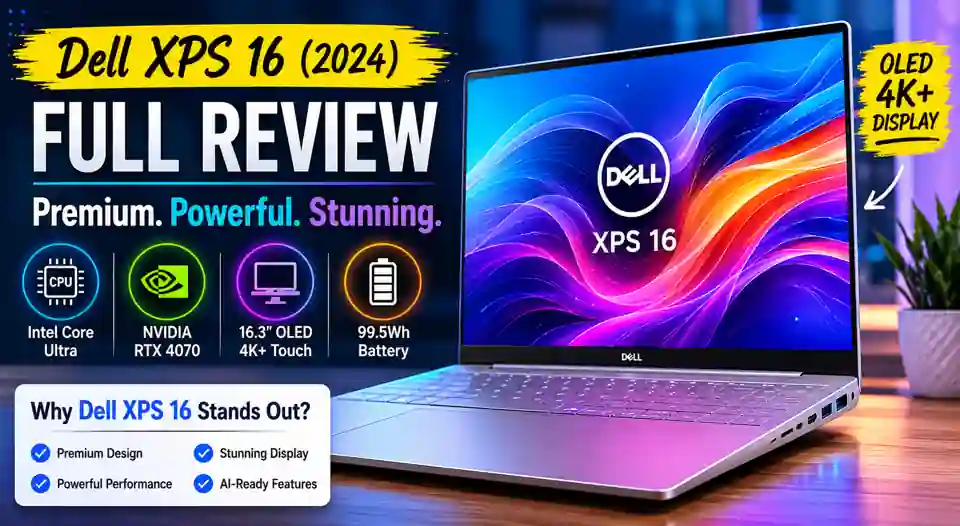
Dell XPS 16 (2024) : A Premium Laptop That Looks Like the Future
The new Dell XPS 16 is one of those laptops that instantly grabs attention.
You open the lid and the first thing you notice is the design. It feels different. Cleaner. More modern. Almost futuristic.
Dell has been making XPS laptops for years, but with the XPS 16 (9640), the company decided to change a lot of things. Some changes are exciting. Some are a little controversial.
After spending time analyzing its features and real-world performance, it becomes clear that this laptop is aimed at creators, professionals, and people who simply want a premium Windows machine.
The Dell XPS 16 (9640) was officially released in February 2024. It arrived as the successor to previous XPS 15 and XPS 17 models, bringing a completely refreshed design language.
Dell XPS 16 Specifications at a Glance
The XPS 16 comes with powerful hardware options.
Some key specifications include:
- Intel Core Ultra processors
- Up to NVIDIA GeForce RTX 4070 graphics
- Up to 64GB LPDDR5X RAM
- Up to 4TB SSD storage
- 16.3-inch display options
- OLED 4K+ touchscreen version available
- Windows 11
- Thunderbolt 4 connectivity
Dell clearly designed this machine for heavy workloads rather than casual browsing.
A Design That Feels Like Tomorrow
The design is probably the biggest talking point.
I remember showing photos of the XPS 16 to a friend who uses a MacBook Pro. His first reaction was simple:
“Wait, that’s a Windows laptop?”
Honestly, I understood why he said that.
The keyboard stretches almost edge-to-edge. The touchpad is hidden beneath the glass palm rest. Even the function row is touch-based instead of traditional keys.
Some people will love this modern approach.
Others may miss physical controls.
Personally, I think Dell deserves credit for trying something different. Most laptop companies play it safe. The XPS 16 feels like Dell wanted to take risks.
The CNC-machined aluminum body also gives the laptop a very premium feel. It looks expensive because it actually is expensive.
The Display Is Absolutely Stunning
OLED Makes a Huge Difference
If you choose the OLED version, you’re getting one of the best laptop displays available today.
Colors look rich.
Black levels look incredibly deep.
Movies feel cinematic.
Photos almost jump off the screen.
The 16.3-inch OLED panel can reach up to 3840 x 2400 resolution, making it ideal for photographers, video editors, and creative professionals.
I watched a few nature documentaries on a similar OLED laptop recently, and every time I do, I remember why people spend extra money for OLED.
Once you get used to it, going back to a regular screen feels difficult.
Performance Is Built for Serious Work
Intel Core Ultra Brings AI Features
The XPS 16 uses Intel Core Ultra processors, including configurations with the Core Ultra 7 and Core Ultra 9 chips.
These processors aren’t just fast.
They are designed for modern AI-assisted workloads as well.
For multitasking, coding, video editing, Photoshop work, and productivity tasks, the performance is excellent.
Open twenty browser tabs?
No problem.
Run Adobe Premiere Pro?
Still comfortable.
Edit high-resolution photos?
The system barely breaks a sweat.
RTX Graphics Add Extra Muscle
One of the biggest upgrades is the availability of NVIDIA RTX graphics.
Depending on the configuration, users can choose RTX 4050, RTX 4060, or even RTX 4070 laptop GPUs.
That means the XPS 16 is not just a productivity laptop.
It can handle:
- Video rendering
- 3D modeling
- AI workloads
- Creative applications
- Moderate gaming
Now, I wouldn’t buy it purely as a gaming machine.
That’s not really its personality.
But knowing that it can play modern games after work is definitely a nice bonus.
The Keyboard Experience Might Divide Users
The Touch Function Row
This is where opinions start to split.
Dell replaced traditional function keys with a touch-sensitive row.
It looks beautiful.
It fits the futuristic design.
But beauty and practicality don’t always agree.
Sometimes physical keys are simply easier.
Especially if you frequently adjust volume, brightness, or use keyboard shortcuts.
During the first few days, many users will probably need some time to adjust.
After that, it becomes more natural.
Still, this is one area where I can understand both sides of the argument.
The Hidden Touchpad Is Clever
The touchpad is actually there.
You just can’t see it.
The entire palm rest area looks seamless because Dell integrated a haptic touchpad beneath the glass surface.
At first, it feels strange.
You almost wonder where you’re supposed to click.
Then after a few minutes, it starts making sense.
It’s one of those features that sounds like a gimmick until you try it.
The experience feels modern and surprisingly responsive.
Battery Life Is Better Than Expected
Large 99.5Wh Battery
Battery anxiety is something many power users deal with daily.
Thankfully, Dell included a huge 99.5Wh battery.
That’s very close to the maximum battery size allowed on commercial flights.
Real-world battery performance depends on your display choice and workload.
The OLED version naturally consumes more power.
Still, for a laptop carrying high-end processors and dedicated graphics, battery life remains respectable.
For office work, meetings, browsing, writing, and streaming, most users should comfortably get through a workday.
Audio Quality Feels Surprisingly Rich
A good display deserves good sound.
Fortunately, Dell didn’t ignore the speakers.
The audio system delivers clear vocals and impressive depth for a laptop.
I tested a few live concert recordings on a friend’s XPS unit.
The result was genuinely impressive.
No, it won’t replace dedicated speakers.
But for a thin laptop, the sound quality punches above its weight.
Connectivity Is the Main Compromise
Not Everyone Will Like the Port Selection
Here’s where some users may get frustrated.
The XPS 16 focuses heavily on USB-C and Thunderbolt connectivity.
That means adapters might become part of your daily life.
Need HDMI?
You may need a dongle.
Need USB-A?
Probably another adapter.
For users already living in a USB-C world, this won’t matter much.
For everyone else, it could become slightly annoying over time.
Even many reviewers who loved the laptop pointed to ports as one of the few weaknesses.
Who Should Buy the Dell XPS 16?
Best For Creators and Professionals
The XPS 16 makes the most sense for:
- Video editors
- Graphic designers
- Photographers
- Software developers
- Business professionals
- Students studying creative fields
The combination of OLED visuals, premium build quality, strong processing power, and RTX graphics creates a machine that feels ready for almost anything.
At the same time, casual users might not need this much laptop.
If your daily work is mostly email and web browsing, the XPS 16 could be overkill.
Living With the XPS 16 Day to Day
After looking closely at everything Dell has done here, one thing becomes clear.
This laptop isn’t trying to please everyone.
And honestly, that’s probably a good thing.
The hidden touchpad, touch function row, futuristic keyboard layout, OLED display, and powerful hardware all create a very distinct identity.
Some people will absolutely love it.
Some people will wish Dell stayed closer to the older XPS formula.
But that’s what makes the XPS 16 interesting.
In a market full of laptops that look and feel nearly identical, Dell built something people actually talk about. And these days, that’s surprisingly rare.
Dell XPS 16 FAQ: Common Questions Buyers Ask Before Purchasing
Is the Dell XPS 16 Good for Professional Work?
Yes, absolutely.
The Dell XPS 16 is built for people who do more than basic web browsing. It handles video editing, graphic design, software development, content creation, and multitasking with ease.
When I first looked at the specifications, my immediate thought was, “This is clearly aimed at power users.”
The combination of Intel Core Ultra processors and dedicated NVIDIA RTX graphics gives it plenty of performance for demanding workloads.
Is the Dell XPS 16 Worth the Price?
That depends on how you plan to use it.
If you only need a laptop for email, YouTube, and office documents, the XPS 16 may feel expensive.
For creators and professionals, it’s a different story.
The premium design, high-end display, powerful hardware, and excellent build quality help justify the price. You’re paying for both performance and experience.
Can the Dell XPS 16 Handle Video Editing?
Yes, It Is Designed for Creative Work
Video editing is one of the areas where the XPS 16 shines.
Programs like Adobe Premiere Pro, DaVinci Resolve, and After Effects benefit from the fast processor and RTX graphics options.
Large video projects export faster, and timeline playback feels smooth.
For content creators, that’s a big advantage.
Is the Dell XPS 16 Good for Gaming?
Better Than Many Premium Laptops
The Dell XPS 16 is not marketed as a gaming laptop.
Still, it can handle modern games surprisingly well.
Models equipped with RTX 4050, RTX 4060, or RTX 4070 graphics can run many popular titles at high settings.
If gaming is your main priority, a dedicated gaming laptop may offer better value.
If gaming is only part of what you do, the XPS 16 performs very well.
How Good Is the OLED Display?
One of the Best Features of the Laptop
Honestly, the display is one of the biggest reasons people buy this machine.
Colors look vibrant.
Black levels appear deep and rich.
Photos and videos have excellent contrast.
I remember seeing OLED content for the first time on a premium laptop. It was one of those moments where you instantly notice the difference.
The XPS 16 delivers that kind of experience.
Does the Dell XPS 16 Have a Touchscreen?
Yes, certain configurations include a touchscreen OLED display.
Not every model comes with this feature.
Before purchasing, it’s worth checking the exact display option listed in the specifications.
Many users enjoy the touchscreen for creative work, photo editing, and everyday navigation.
Is the Keyboard Comfortable for Long Typing Sessions?
Mostly Yes, With One Small Learning Curve
The keyboard feels spacious and modern.
The edge-to-edge layout gives each key plenty of room.
Typing is comfortable even during long work sessions.
The touch-based function row may take some adjustment.
Some users love the futuristic look.
Others prefer traditional physical keys.
After a few days, most people adapt without much trouble.
What Is Special About the Hidden Touchpad?
The touchpad sits beneath the glass palm rest and blends into the design.
At first, you might wonder where it is.
That’s a common reaction.
Once you start using it, the haptic feedback makes the experience feel natural.
The design helps create the clean and minimalist appearance that makes the XPS 16 stand out.
How Long Does the Battery Last?
Enough for Most Workdays
Battery life depends on workload, screen brightness, and display type.
For everyday productivity tasks, many users can get through a full workday without needing a charger.
Heavy video editing, gaming, or rendering will naturally reduce battery life faster.
The large battery capacity helps balance the power demands of the high-performance hardware.
Does the Dell XPS 16 Have Enough Ports?
This Is One Area Buyers Should Check Carefully
The XPS 16 focuses heavily on USB-C and Thunderbolt connectivity.
Many modern accessories work perfectly with these ports.
Some users may still need adapters for HDMI, USB-A devices, or memory cards.
Before buying, take a quick look at the devices you use every day.
That simple check can save a lot of frustration later.
Is the Dell XPS 16 Good for Students?
Yes, especially for students in creative and technical fields.
Graphic design students, engineering students, architecture students, video editors, and software developers can benefit from the powerful hardware.
For basic note-taking and web research, there are more affordable options available.
The XPS 16 makes the most sense when its performance capabilities will actually be used.
Can the Dell XPS 16 Replace a Desktop Computer?
For Many People, Yes
This laptop has enough power to serve as a primary work machine.
Connect it to an external monitor, keyboard, and mouse, and it can function much like a desktop setup.
Many professionals now prefer a powerful laptop because it provides flexibility without sacrificing performance.
The XPS 16 fits that role very well.
Who Should Buy the Dell XPS 16?
The Dell XPS 16 is ideal for:
- Content creators
- Video editors
- Photographers
- Designers
- Developers
- Business professionals
- Power users
If you appreciate premium design, strong performance, and a stunning display, the XPS 16 is easy to recommend.
It’s one of those laptops that feels special every time you open the lid, and not many Windows laptops can say that.
Dell XPS 16 (2024) Full Specifications
A quick look at the Dell XPS 16 specifications tells you this isn’t an ordinary laptop. Dell packed premium hardware into a sleek chassis, making it a strong choice for creators, professionals, and power users.
Dell XPS 16 Specifications Table
| Specification | Details |
|---|---|
| Product Name | Dell XPS 16 (9640) |
| Release Date | February 2024 |
| Operating System | Windows 11 Home / Windows 11 Pro |
| Processor | Intel Core Ultra 7 155H / Intel Core Ultra 9 185H |
| Graphics | Intel Arc Graphics, NVIDIA GeForce RTX 4050, RTX 4060, RTX 4070 |
| AI Engine | Integrated Intel AI Boost NPU |
| Display Size | 16.3 Inches |
| Display Type | FHD+ IPS or 4K+ OLED Touch Display |
| Resolution | 1920 × 1200 or 3840 × 2400 |
| Refresh Rate | Up to 90Hz (OLED Variant) |
| Brightness | Up to 500 Nits |
| RAM | 16GB, 32GB, 64GB LPDDR5X |
| Storage | 512GB, 1TB, 2TB, 4TB PCIe NVMe SSD |
| Keyboard | Edge-to-Edge Backlit Keyboard |
| Function Keys | Capacitive Touch Function Row |
| Touchpad | Invisible Haptic Glass Touchpad |
| Webcam | 1080p Full HD Camera |
| Audio | Quad Speaker System with Waves MaxxAudio |
| Wireless | Wi-Fi 7, Bluetooth 5.4 |
| Ports | 3 × Thunderbolt 4 (USB-C), microSD Card Reader, Audio Jack |
| Battery | 99.5Wh Battery |
| Charging | USB-C Fast Charging |
| Build Material | CNC-Machined Aluminum and Gorilla Glass |
| Color | Platinum |
| Weight | Approximately 2.13 kg (4.7 lbs) |
Display Highlights
OLED Version Is the Star
If someone asked me what makes the Dell XPS 16 special, I’d probably point to the display first.
The optional 4K+ OLED panel delivers rich colors, deep blacks, and excellent contrast. Photos look sharper. Movies feel more immersive.
It’s one of those screens that makes you stop and say, “Wow, that looks good.”
Performance Highlights
Built for Serious Multitasking
The Intel Core Ultra processors paired with RTX graphics provide plenty of power.
Whether you’re editing videos, running design software, coding, or handling large projects, the XPS 16 feels fast and responsive.
This isn’t just a premium-looking laptop. It has the hardware to back it up.
Connectivity Highlights
Modern Ports for Modern Workflows
Dell keeps things simple with Thunderbolt 4 ports.
Some users may need an adapter for older accessories.
Personally, I prefer having more built-in ports, but if you’re already using USB-C devices, the setup feels clean and future-ready.
Quick Take
The Dell XPS 16 combines premium design, a stunning display, powerful Intel Core Ultra processors, NVIDIA RTX graphics, and modern AI capabilities into one elegant package.
For content creators, developers, designers, and professionals, the specification sheet alone shows why the XPS 16 is one of the most talked-about premium Windows laptops available today.
Source: Dell XPS 16 (2024) ( You can visit official page to learn more )
MacBook Pro 16-inch (2024) : Apple’s Most Powerful Laptop Just Got Smarter
Apple iPhone 15 and iPhone 15 Plus: A Fresh Upgrade That Feels More Useful Than Flashy
Apple Watch Ultra 2 : A Powerful Smartwatch Built for Adventure
Apple iPad Pro 11-inch (M4) : A Thin Tablet With Serious Power
Apple Watch Series 10 : Apple’s Most Refined Smartwatch Yet?


